顯示具有 state pattern 標籤的文章。 顯示所有文章

2017年7月16日 星期日

About states, part III

In last blog I talked about how state pattern is not enough for real application development if the states are quite complex. Even if you finished the implementation you would put in a lot of effort into maintenance. So, what can you do?

We talked about state transition and hierarchical and parallel states. For better understanding, you should read a paper published over 30 years ago, David Harel, statecharts. You should read it at least once. Read it, and come back here, I will be waiting here.

Long time ago, I was so frustrating on how difficult it is to manage states in program until I found this paper via google about 10 years ago. I read it and think to myself, that's it! If there's a library offer the statecharts functionality, it will be great! It certainly will enable us to develop better software and make it much easier to maintain.

To my surprise, I couldn't find a C++ library offer this functionality. As a result, I wrote one myself. Till these days, it's still one of the best things I ever developed.

Although it's most intuitive as human beings are good at grasping graphical charts, it is not so for a computer. You have to translate it to texts so computer can process it. There's a specification developed by W3C named SCXML in XML format. Please familiarize yourself with them from the official side.

    3.2 <scxml>
    3.3 <state>
    3.4 <parallel>
    3.5 <transition>
    3.6 <initial>
    3.7 <final>
    3.8 <onentry>
    3.9 <onexit>
    3.10 <history>

My idea is to use the format defined in scxml except the executable and control flow part, since we are using it with a programming language. It would be just like a black box. By using the signal/slots mechanism you simply connect to the signals it triggered when the onentry, onexit, or ontransit happened. You basically only invoked it's enqueEvent() and frame_move() methods. In stead of make many function calls, It's much easier to use by making it a framework, avoiding handling the trivia. Although you will have to do thing following it's rule.

Well, later I found out that the Boost libraries offer not only one but two libraries that support state machines: boost Meta State Machine and boost statechart. They use jargon defined in UML, there's difference with what Harel or SCXML used. I personally don't like it. You could try them out to see if you like either one, maybe you will find one suit your need. It seems they were not present when I start looking for a state machine solution. But even if they were, I would still develop one myself though, they are simply not what I wanted. If you are writing your own version, consider follow the scxml format like me. Although something like JSON may be more to your liking, but I think it's a good thing to have a standard.

Code utilize my library looks like this:
static string app_scxml =
"<scxml initial='init'>"
"   <state id='init'>"
"       <transition event='login' target='online'/>"
"   </state>"
"   <state id='online'>"
"       <state id='idle'>"
"           <transition event='hmi-connected' target='use'/>"
"       </state>"
"       <state id='use'>"
"           <transition event='hmi-disconnected' cond='condNoConnection' target='idle'/>"
"       </state>"
"   </state>"
"   <transition event='logout' target='offline'/>"
"   <final id='offline'/>"
"</scxml>"
;


struct AppServiceHandler
{
    // member declarations
    . 
    .
    .
    wtk::Net::StateMachine                  *mach_;
    
    AppServiceHandler()
    : (0)
    .
    .
    .
    {
        
        mach_ = StateMachineManager::instance()->getMach("app_scxml");
        REGISTER_STATE_SLOT (mach_, "init", &AppServiceHandler::onentry_init, &AppServiceHandler::onexit_init, this);
        REGISTER_STATE_SLOT (mach_, "online", &AppServiceHandler::onentry_online, &AppServiceHandler::onexit_online, this);
        REGISTER_STATE_SLOT (mach_, "idle", &AppServiceHandler::onentry_idle, &AppServiceHandler::onexit_idle, this);
        REGISTER_STATE_SLOT (mach_, "use", &AppServiceHandler::onentry_use, &AppServiceHandler::onexit_use, this);
        REGISTER_STATE_SLOT (mach_, "offline", &AppServiceHandler::onentry_offline, &AppServiceHandler::onexit_offline, this);
        
        boost::function<bool()> cond_slot;
        mach_->setCondSlot("condNoConnection", cond_slot = boost::bind(&AppServiceHandler::PRIVATE::condNoConnection, this));
        mach_->StartEngine();
    }
    
    ~AppServiceHandler()
    {
        mach_->ShutDownEngine(true);
    }
    
    // member functions
    .
    .
    .
    // 
    void onentry_init ();
    void onexit_init ();
    void onentry_online ();
    void onexit_online ();
    void onentry_idle ();
    void onexit_idle ();
    void onentry_use ();
    void onexit_use ();
    void onentry_offline ();
    void onexit_offline ();
    bool condNoConnection () const;
    

Observe that you can define the statcharts as a string in one place. In stead of spread the states information all over the place and define the states relationship all over the place. It is much easier to understand and later to maintain.

Below is an scxml definition for one of a game component I developed previously.

<scxml initial="alive">
 <state id="spawn">
  <transition event="play" target="alive"/>
 </state>
 
 <parallel id="alive">
  <transition event="die" target="dead"/>
  
  <state id="gun">
   <transition event="gun" target="gun_on"/>
   <state id="gun_off">
   </state>
   <state id="gun_on">
    <state id="gun_reload">
     <transition event="gun_reloaded" target="gun_fire"/>
    </state>
    <state id="gun_fire">
     <transition event="no_bullet" target="gun_off"/>
    </state>
   </state>
  </state>
  
  <state id="wave">
   <transition event="wave" target="wave_on"/>
   <state id="wave_off">
   </state>
   <state id="wave_on">
    <transition event="no_wave" target="wave_off"/>
   </state>
  </state>
  
  <state id="radar">
   <transition event="radar" target="radar_on"/>
   <state id="radar_off">
   </state>
   <state id="radar_on">
    <transition event="radar_off" target="radar_off"/>
   </state>
  </state>
  
  <state id="shield">
   <state id="shield_off">
    <transition event="shield" target="shield_on"/>
   </state>
   <state id="shield_on">
    <transition event="collide_dot" target="shield_explode"/>
    <transition event="collide_boss" target="shield_explode"/>
   </state>
   <state id="shield_explode">
    <transition event="shield" target="shield_on"/>
    <transition event="shield_off" target="shield_off"/>
   </state>
  </state>
  
  <state id="phantom">
   <transition event="phantom" target="phantom_on"/>
   <state id="phantom_off">
   </state>
   <state id="phantom_on">
    <transition event="phantom_off" target="phantom_off"/>
   </state>
  </state>
  
  <state id="explode">
   <transition event="explode" cond="cond_FB_enabled" ontransit="spawnExplode" target="firebird_on"/>
   <transition event="explode" ontransit="spawnExplode" target="explode_on"/>
   <state id="explode_off">
   </state>
   <state id="explode_on">
    <transition event="explode_off" target="explode_off"/>
   </state>
   <state id="firebird_on">
    <transition event="firebird_off" target="explode_off"/>
   </state>
  </state>


  <state id="display">
   <transition event="shielding_on" cond="!In(firebirding)" target="shielding"/>
   <transition event="phantom_on" cond="!In(firebirding)" target="phantoming"/>
   <transition event="firebird_on" cond="!In(firebirding)" target="firebirding"/>
   <state id="normal">
   </state>
   <state id="shielding">
    <transition event="shielding_off" cond="In(phantom_on)" target="phantoming"/>
    <transition event="shielding_off" target="normal"/>
   </state>
   <state id="phantoming">
    <transition event="phantom_off" cond="In(shield_explode)" target="shielding"/>
    <transition event="phantom_off" target="normal"/>
   </state>
   <state id="firebirding">
    <transition event="firebird_off" cond="In(phantom_on)" target="phantoming"/>
    <transition event="firebird_off" cond="In(shield_explode)" target="shielding"/>
    <transition event="firebird_off" target="normal"/>
   </state>
  </state>
 </parallel>
 
 <state id="dead">
  <transition event="play" target="alive"/>
 </state>
</scxml>

Intimidating, right? If it's not that I utilized the statechart library. I can't image how difficult it would be to debug or trace code if I have to found all the states information all over the place.

I will later upload this scm library to github, you will find it here, stay tuned.

關於狀態(states), part III

上次我們談到使用state pattern的支巧不足以對付實際開發的需求,只是套用state pattern的方法在維護上將付出很大的代價,所以該如何是好呢?

我們談到了狀態的轉換(transition)還有階層式與平行狀態等,這裏有篇David Harel, statecharts在數十年前寫的paper,你一定要讀一次,去讀完它,我等你。

很久很久以前我對於怎麼處理程式中狀態的問題非常傷腦筋,直到我大概十年前google到了這篇paper,讀完後覺得豁然開朗,心想如果有提供這種功能的library可以用就太好了,如果我們能善加利用支援statechart功能的library,一定能寫出更好使用與維護的程式碼。

讓我疑惑的是,似乎找不到C++的library,結果我自己寫了一套。直到今天還是我開發的東西中最好用的東西之一。

用圖型表示雖然最直覺,人類能很快懂,但是要使用在電腦程式裏當然還是得變成文字才方便。W3C定義了SCXML, 用xml的格式來表達。
重點的這些元件還請上官網去熟悉一下

    3.2 <scxml>
    3.3 <state>
    3.4 <parallel>
    3.5 <transition>
    3.6 <initial>
    3.7 <final>
    3.8 <onentry>
    3.9 <onexit>
    3.10 <history>

我的構想就是使用跟scxml定義的一樣的格式但是不實作它定的executable的功能,把它當一個黑盒子一樣,它用signal/slot的機制讓你去connect onentry, ontransit, onexit等時候發出的signal。控制它基本上只會用到enqueEvent()與frame_move()。用一般的方式只是一些function叫來叫去的話不是很好用,我們需要framework來幫我們處理很多鎖事,儘管使用的話就得遵守framework的規則。

後來我發現boost library中有兩個library提供state machine的功能,boost Meta State Machineboost statechart。不過它們使用的術語是UML中定義的,與原本Harel使用的不同,個人實在不欣賞。你可以學著使用看看,或許合你味口也說不定。當初似乎還沒這兩個library,不過即使是現在我應該也會選擇--自己寫一個,建議如果你也想寫一套的話,照WC3的spec來開發,有一個共同的標準是好事。

我個人寫的scm的framework, 使用起來像這樣

static string app_scxml =
"<scxml initial='init'>"
"   <state id='init'>"
"       <transition event='login' target='online'/>"
"   </state>"
"   <state id='online'>"
"       <state id='idle'>"
"           <transition event='hmi-connected' target='use'/>"
"       </state>"
"       <state id='use'>"
"           <transition event='hmi-disconnected' cond='condNoConnection' target='idle'/>"
"       </state>"
"   </state>"
"   <transition event='logout' target='offline'/>"
"   <final id='offline'/>"
"</scxml>"
;


struct AppServiceHandler
{
    // member declarations
    . 
    .
    .
    wtk::Net::StateMachine                  *mach_;
    
    AppServiceHandler()
    : (0)
    .
    .
    .
    {
        
        mach_ = StateMachineManager::instance()->getMach("app_scxml");
        REGISTER_STATE_SLOT (mach_, "init", &AppServiceHandler::onentry_init, &AppServiceHandler::onexit_init, this);
        REGISTER_STATE_SLOT (mach_, "online", &AppServiceHandler::onentry_online, &AppServiceHandler::onexit_online, this);
        REGISTER_STATE_SLOT (mach_, "idle", &AppServiceHandler::onentry_idle, &AppServiceHandler::onexit_idle, this);
        REGISTER_STATE_SLOT (mach_, "use", &AppServiceHandler::onentry_use, &AppServiceHandler::onexit_use, this);
        REGISTER_STATE_SLOT (mach_, "offline", &AppServiceHandler::onentry_offline, &AppServiceHandler::onexit_offline, this);
        
        boost::function<bool()> cond_slot;
        mach_->setCondSlot("condNoConnection", cond_slot = boost::bind(&AppServiceHandler::PRIVATE::condNoConnection, this));
        mach_->StartEngine();
    }
    
    ~AppServiceHandler()
    {
        mach_->ShutDownEngine(true);
    }
    
    // member functions
    .
    .
    .
    // 
    void onentry_init ();
    void onexit_init ();
    void onentry_online ();
    void onexit_online ();
    void onentry_idle ();
    void onexit_idle ();
    void onentry_use ();
    void onexit_use ();
    void onentry_offline ();
    void onexit_offline ();
    bool condNoConnection () const;
    

注意到我們直接用scxml的格式把state machine定義好,相對於此,你在boost chart或一些其它的library中,各個state的定義與關係的建立通常散落在各處程式碼中。那樣實在不好理解與維護。

下面是我以前開發的一個遊戲中角色的scxml

<scxml initial="alive">
 <state id="spawn">
  <transition event="play" target="alive"/>
 </state>
 
 <parallel id="alive">
  <transition event="die" target="dead"/>
  
  <state id="gun">
   <transition event="gun" target="gun_on"/>
   <state id="gun_off">
   </state>
   <state id="gun_on">
    <state id="gun_reload">
     <transition event="gun_reloaded" target="gun_fire"/>
    </state>
    <state id="gun_fire">
     <transition event="no_bullet" target="gun_off"/>
    </state>
   </state>
  </state>
  
  <state id="wave">
   <transition event="wave" target="wave_on"/>
   <state id="wave_off">
   </state>
   <state id="wave_on">
    <transition event="no_wave" target="wave_off"/>
   </state>
  </state>
  
  <state id="radar">
   <transition event="radar" target="radar_on"/>
   <state id="radar_off">
   </state>
   <state id="radar_on">
    <transition event="radar_off" target="radar_off"/>
   </state>
  </state>
  
  <state id="shield">
   <state id="shield_off">
    <transition event="shield" target="shield_on"/>
   </state>
   <state id="shield_on">
    <transition event="collide_dot" target="shield_explode"/>
    <transition event="collide_boss" target="shield_explode"/>
   </state>
   <state id="shield_explode">
    <transition event="shield" target="shield_on"/>
    <transition event="shield_off" target="shield_off"/>
   </state>
  </state>
  
  <state id="phantom">
   <transition event="phantom" target="phantom_on"/>
   <state id="phantom_off">
   </state>
   <state id="phantom_on">
    <transition event="phantom_off" target="phantom_off"/>
   </state>
  </state>
  
  <state id="explode">
   <transition event="explode" cond="cond_FB_enabled" ontransit="spawnExplode" target="firebird_on"/>
   <transition event="explode" ontransit="spawnExplode" target="explode_on"/>
   <state id="explode_off">
   </state>
   <state id="explode_on">
    <transition event="explode_off" target="explode_off"/>
   </state>
   <state id="firebird_on">
    <transition event="firebird_off" target="explode_off"/>
   </state>
  </state>


  <state id="display">
   <transition event="shielding_on" cond="!In(firebirding)" target="shielding"/>
   <transition event="phantom_on" cond="!In(firebirding)" target="phantoming"/>
   <transition event="firebird_on" cond="!In(firebirding)" target="firebirding"/>
   <state id="normal">
   </state>
   <state id="shielding">
    <transition event="shielding_off" cond="In(phantom_on)" target="phantoming"/>
    <transition event="shielding_off" target="normal"/>
   </state>
   <state id="phantoming">
    <transition event="phantom_off" cond="In(shield_explode)" target="shielding"/>
    <transition event="phantom_off" target="normal"/>
   </state>
   <state id="firebirding">
    <transition event="firebird_off" cond="In(phantom_on)" target="phantoming"/>
    <transition event="firebird_off" cond="In(shield_explode)" target="shielding"/>
    <transition event="firebird_off" target="normal"/>
   </state>
  </state>
 </parallel>
 
 <state id="dead">
  <transition event="play" target="alive"/>
 </state>
</scxml>

有沒有覺得很可怕?如果不是使用這一套statechart的方式,而是讓狀態的資訊散落在程式中,不敢想像維護起來要花多大的功夫。

稍後我將上傳我寫作的scm library到github, 你可以由這裏取得。

2017年7月8日 星期六

About states, part II

Today, we will be continuing our discussion about 「states」.

But, before that, let me digress a bit to talk about 「strategy pattern」.Those of you who made some study about design patterns may found that my example code are more like a strategy pattern than a state pattern. Yes, it is, in fact they are almost the same in spirit. What is strategy pattern? Simply put, under different circumstances(scenario, condition, option), the same behavior may be executed differently. Thus, we made them distinct strategy objects and choose the one used according to difference circumstance dynamically at runtime. When you change state, you may change the strategy used at the same time. It is reasonable. Thus, you could say without fault that state pattern is a kind of strategy pattern . So, let's forget about these jargon. The objective is the same: to prevent the use of a pile of 「if...else...」to clutter our code。It's just in strategy pattern's scenario, we maybe originally used user's choice in conditional statements to make judgement,on the other hand,in state pattern's scenario, we used runtime state to decide what code to run.

OK, back to state pattern. First, let's complete the example code. You can compile the following code and give it a test run.

//GameEvent.h
#ifndef Game_Event_H
#define Game_Event_H

enum {
    StartKey,
    OptionKey,
    UpKey,
    DownKey,
    LeftKey,
    RightKey,
    GameOverEvent,
};

struct InputEvent
{
    int event_;
    InputEvent (int e)
    : event_(e)
    {}  
};

#endif

//GameState.h
#ifndef Game_State_H
#define Game_State_H

#include <string>
#include "GameEvent.h"

class GameApp;

class GameState
{
public:
    virtual ~GameState() {}
    virtual void handle_keyboard_input(GameApp &app, const InputEvent &e) = 0;
    virtual void handle_mouse_input(GameApp &app, const InputEvent &e) = 0;
    virtual void handle_gamepad_input(GameApp &app, const InputEvent &e) = 0;
    virtual void handle_system_event(GameApp &app, const InputEvent &e) = 0;
    virtual std::string name () const = 0;
};


#endif
//GameApp.h
#ifndef Game_App_H
#define Game_App_H

#include "GameEvent.h"
#include "GameState.h"

enum eDifficulty {
    EasyLevel,
    NormalLevel,
    HardLevel,
};

class StateTitleScreen: public GameState
{
public:
    virtual void handle_keyboard_input(GameApp &app, const InputEvent &e);
    virtual void handle_mouse_input(GameApp &app, const InputEvent &e);
    virtual void handle_gamepad_input(GameApp &app, const InputEvent &e);
    virtual void handle_system_event(GameApp &app, const InputEvent &e);

    virtual std::string name () const { return "TitleScreen"; }
};

class StateOptionScreen: public GameState
{
public:
    virtual void handle_keyboard_input(GameApp &app, const InputEvent &e);
    virtual void handle_mouse_input(GameApp &app, const InputEvent &e);
    virtual void handle_gamepad_input(GameApp &app, const InputEvent &e);
    virtual void handle_system_event(GameApp &app, const InputEvent &e);

    virtual std::string name () const { return "OptionScreen"; }
};

class StatePlaying: public GameState
{
public:
    virtual void handle_keyboard_input(GameApp &app, const InputEvent &e);
    virtual void handle_mouse_input(GameApp &app, const InputEvent &e);
    virtual void handle_gamepad_input(GameApp &app, const InputEvent &e);
    virtual void handle_system_event(GameApp &app, const InputEvent &e);

    virtual std::string name () const { return "Playing"; }
};


class StateCountingScore: public GameState
{
    
public:
    StateCountingScore ();
    ~StateCountingScore ();
    
    virtual void handle_keyboard_input(GameApp &app, const InputEvent &e);
    virtual void handle_mouse_input(GameApp &app, const InputEvent &e);
    virtual void handle_gamepad_input(GameApp &app, const InputEvent &e);
    virtual void handle_system_event(GameApp &app, const InputEvent &e);

    virtual std::string name () const { return "CountingScore"; }
};

class GameApp
{
    GameState *game_state_; // 目前遊戲狀態物件
    eDifficulty difficulty_;

    friend class StateTitleScreen;
    friend class StateOptionScreen;
    friend class StatePlaying;
    friend class StateCountingScore;

    void set_state (GameState *state);
    
public:
    GameApp();
    virtual ~GameApp() {}

    void handle_keyboard_input(const InputEvent &e);
    void handle_mouse_input(const InputEvent &e);
    void handle_gamepad_input(const InputEvent &e);
    void handle_system_event(const InputEvent &e);
};
#endif

// main.cpp
#include <iostream>
#include <string>
#include "GameApp.h"

using namespace std;

//class StateTitleScreen
void StateTitleScreen::handle_keyboard_input(GameApp &app, const  InputEvent &e)
{
    if (e.event_ == StartKey) {
        app.set_state(new StatePlaying);
    } else if (e.event_ == OptionKey) {
        app.set_state(new StateOptionScreen);
    }
}

void StateTitleScreen::handle_mouse_input(GameApp &app, const  InputEvent &e)
{
    //...
}

void StateTitleScreen::handle_gamepad_input(GameApp &app, const  InputEvent &e)
{
    //...
}

void StateTitleScreen::handle_system_event(GameApp &app, const  InputEvent &e)
{
    //...
}

//class StateOptionScreen
void StateOptionScreen::handle_keyboard_input(GameApp &app, const  InputEvent &e)
{
    // logic to navigate option screen, set game difficulty, screen resolution, etc.
}

void StateOptionScreen::handle_mouse_input(GameApp &app, const  InputEvent &e)
{
    //...
}

void StateOptionScreen::handle_gamepad_input(GameApp &app, const  InputEvent &e)
{
    //...
}

void StateOptionScreen::handle_system_event(GameApp &app, const  InputEvent &e)
{
    //...
}

//class StatePlaying
void StatePlaying::handle_keyboard_input(GameApp &app, const  InputEvent &e)
{
    if (e.event_ == GameOverEvent) {
        app.set_state(new StateCountingScore);
    }
}

void StatePlaying::handle_mouse_input(GameApp &app, const  InputEvent &e)
{
    //...
}

void StatePlaying::handle_gamepad_input(GameApp &app, const  InputEvent &e)
{
    //...
}

void StatePlaying::handle_system_event(GameApp &app, const  InputEvent &e)
{
    //...
}


// for simplfication, we use a global variable to set if score counting is done.
bool g_counting_done;

//class StateCountingScore
StateCountingScore::StateCountingScore ()
{
    cout << "\t\tgame over!" << endl;
}

StateCountingScore::~StateCountingScore ()
{
    g_counting_done = false;
}

void StateCountingScore::handle_keyboard_input(GameApp &app, const  InputEvent &e)
{
    // handle input only after score counting done.
    if (g_counting_done) { // any input is ok
        app.set_state(new StateTitleScreen);
    }
}

void StateCountingScore::handle_mouse_input(GameApp &app, const  InputEvent &e)
{
    //...
}

void StateCountingScore::handle_gamepad_input(GameApp &app, const  InputEvent &e)
{
    //...
}

void StateCountingScore::handle_system_event(GameApp &app, const  InputEvent &e)
{
    //...
}


GameApp::GameApp()
: game_state_(NULL)
, difficulty_(EasyLevel)
{
    this->set_state(new StateTitleScreen);
}


void GameApp::set_state(GameState* state)
{
    delete game_state_;
    game_state_ = state;
    cout << "change state to " << state->name() << endl;
}


void GameApp::handle_keyboard_input(const  InputEvent &e)
{
    game_state_->handle_keyboard_input (*this, e);
}

void GameApp::handle_mouse_input(const  InputEvent &e)
{
    game_state_->handle_mouse_input (*this, e);
}

void GameApp::handle_gamepad_input(const  InputEvent &e)
{
    game_state_->handle_gamepad_input (*this, e);
}

void GameApp::handle_system_event(const  InputEvent &e)
{
    game_state_->handle_system_event(*this, e);
}


int main()
{
    GameApp game_app;
    cout << "\tpress up key" << endl;
    game_app.handle_keyboard_input(InputEvent(UpKey));
    cout << "\tpress up key" << endl;
    game_app.handle_keyboard_input(InputEvent(UpKey));
    cout << "\tpress down key" << endl;
    game_app.handle_keyboard_input(InputEvent(DownKey));
    cout << "\tpress down key" << endl;
    game_app.handle_keyboard_input(InputEvent(DownKey));
    cout << "\tpress start key" << endl;
    game_app.handle_keyboard_input(InputEvent(StartKey));
    cout << "\t\tplaying..." << endl;
    cout << "\t\tthe Boss..." << endl;
    game_app.handle_keyboard_input(InputEvent(GameOverEvent));
    cout << "\tpress start key" << endl;
    game_app.handle_keyboard_input(InputEvent(StartKey));
    cout << "\t\tscore counting done" << endl;
    g_counting_done = true;
    cout << "\tpress start key" << endl;
    game_app.handle_keyboard_input(InputEvent(StartKey));
return 0; }
You should see the following output:
change state to TitleScreen

        press up key

        press up key

        press down key

        press down key

        press start key

change state to Playing

                playing...

                the Boss...

                game over!

change state to CountingScore

        press start key

                score counting done

        press start key

change state to TitleScreen
We observe that the user's input is delegated to state object to handle. And when it is time to change state we utilize GameApp::set_state(GameState* state) to do the transition. You can make some adjustment to meet the runtime requirement, like use shared pointer to do memory management instead of raw pointers. You can also pre-created all state objects instead of spawn new one every time state change if you don't mind use more memory.

That's it, it's enough to do simple states management this way. For real life applications, you may need more. Unlike this simple example, you may want to do some job on entering a state, do some other job on leaving, and do yet another one in transition. You can, like StateCountingScore class here, do the entry job in constructor and do the exit job in destructor. This is obviously not a good idea. You don't do complex things in constructor or destructor, which may bring you unexpected trouble. Also, if you use pre-created state objects, no constructor or destructor will be invoked when state change! An obvious better method is define pure virtual methods onentry(), onexit() in base class. When doing state change, you call onexit() of old state object, and then call onentry() of the new. In addition, you would define an ontransit() method, and call it between onexit() and onentry(). Like the following code:

class GameState
{
public:
    virtual ~GameState() {}
    virtual void handle_keyboard_input(GameApp &app, const InputEvent &e) = 0;
    virtual void handle_mouse_input(GameApp &app, const InputEvent &e) = 0;
    virtual void handle_gamepad_input(GameApp &app, const InputEvent &e) = 0;
    virtual void handle_system_event(GameApp &app, const InputEvent &e) = 0;
    virtual std::string name () const = 0;
    virtual void onentry(GameApp &app)=0;
    virtual void onexit(GameApp &app)=0;
    virtual void ontransit(GameApp &app, std::string const&target_state)=0;
};
void GameApp::set_state(GameState* state)
{
    if (game_state_) {
        game_state_->onexit(*this);
        game_state_->ontransit(*this, state->name());
        delete game_state_;
    }
    game_state_ = state;
    game_state_->onentry(*this);
}
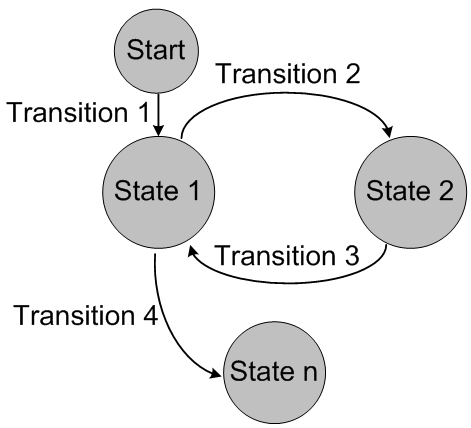
Here, in ontransit() method, you may want to do different things depending on the target state. This is a potential maintenance hazard, we will come back to it later. In the mean time, let's think more thoroughly. What happened when you apply state concept to control system behavior? In addition to onentry(), onexit(), ontransit(), what physical requirements you may need to meet when apply state to control system behavior?

When you think about state, this may be the image presented in your mind


Every state is independent to each other, live separately. But, this is not real in real life. Everything in real life have the concept of state in it, period. We as programmer has a state named 'developing', you can divide it into three child states, 'coding', 'debugging', and 'testing'. When you are in one of these three states, ain't you in 'developing' state too? That's it, often the states are hierarchical. In addition, Object are composed of many components, each component has its state, they as a whole, is the state of the object. You can't modelling these physical states with state pattern effectively. Continue the example of a programmer, when you modelling it using state pattern, you can only define states like 'coding', 'debugging', 'testing', and other terminal states (like 'sleeping', 'foraging', 'resting', etc.). 'developing' is just a logical state, so, in the program, when you enter one of the three states('coding', et al.) you should know you are entering 'developing' state too, you have to remember to invoke developing state object's onentry() in addition to the terminal one. You have to remember to invoke developing state object's onexit() when leave one of the three states too. That's not an welcome dependency. And when you have to check whether you are in 'developing' state, you have to check if you are in one of the three. As you can see, when facing more practical scenarios, state pattern is powerless. What should we do?

We will continue our discussion next time, please look forward to it...

關於狀態(states) part II

今天我們來繼續「狀態」的話題。

不過我們先岔開一下話題談一下strategy pattern。有進行design pattern研究的朋友應該都發現了,我們的例子看起來更像strategy pattern。是的,它們在精神上是差不多的。strategy pattern簡單說就是在不同的情景、條件、選擇下,某個行為的執行方法可能不同,所以我們把這些方法變成可依照時機使用/切換的策略物件,可以在執行時期變換。狀態切換時,你同時切換某個行為的策略物件也是很合理的。因此,說state pattern是一種strategy pattern也不為過。其實不用拘泥於這些術語。我們目的一樣是避免一堆重複的「if..else...」。只是在strategy pattern原本可能是拿使用者選擇的策略來做判斷,而在state pattern則是用執行時的狀態做判斷。

ok, 回到state pattern。我們先把上次的範例做完整一點吧。你可以把下面的程式碼編譯起來跑看看。

//GameEvent.h
#ifndef Game_Event_H
#define Game_Event_H

enum {
    StartKey,
    OptionKey,
    UpKey,
    DownKey,
    LeftKey,
    RightKey,
    GameOverEvent,
};

struct InputEvent
{
    int event_;
    InputEvent (int e)
    : event_(e)
    {}  
};

#endif

//GameState.h
#ifndef Game_State_H
#define Game_State_H

#include <string>
#include "GameEvent.h"

class GameApp;

class GameState
{
public:
    virtual ~GameState() {}
    virtual void handle_keyboard_input(GameApp &app, const InputEvent &e) = 0;
    virtual void handle_mouse_input(GameApp &app, const InputEvent &e) = 0;
    virtual void handle_gamepad_input(GameApp &app, const InputEvent &e) = 0;
    virtual void handle_system_event(GameApp &app, const InputEvent &e) = 0;
    virtual std::string name () const = 0;
};


#endif
//GameApp.h
#ifndef Game_App_H
#define Game_App_H

#include "GameEvent.h"
#include "GameState.h"

enum eDifficulty {
    EasyLevel,
    NormalLevel,
    HardLevel,
};

class StateTitleScreen: public GameState
{
public:
    virtual void handle_keyboard_input(GameApp &app, const InputEvent &e);
    virtual void handle_mouse_input(GameApp &app, const InputEvent &e);
    virtual void handle_gamepad_input(GameApp &app, const InputEvent &e);
    virtual void handle_system_event(GameApp &app, const InputEvent &e);

    virtual std::string name () const { return "TitleScreen"; }
};

class StateOptionScreen: public GameState
{
public:
    virtual void handle_keyboard_input(GameApp &app, const InputEvent &e);
    virtual void handle_mouse_input(GameApp &app, const InputEvent &e);
    virtual void handle_gamepad_input(GameApp &app, const InputEvent &e);
    virtual void handle_system_event(GameApp &app, const InputEvent &e);

    virtual std::string name () const { return "OptionScreen"; }
};

class StatePlaying: public GameState
{
public:
    virtual void handle_keyboard_input(GameApp &app, const InputEvent &e);
    virtual void handle_mouse_input(GameApp &app, const InputEvent &e);
    virtual void handle_gamepad_input(GameApp &app, const InputEvent &e);
    virtual void handle_system_event(GameApp &app, const InputEvent &e);

    virtual std::string name () const { return "Playing"; }
};


class StateCountingScore: public GameState
{
    
public:
    StateCountingScore ();
    ~StateCountingScore ();
    
    virtual void handle_keyboard_input(GameApp &app, const InputEvent &e);
    virtual void handle_mouse_input(GameApp &app, const InputEvent &e);
    virtual void handle_gamepad_input(GameApp &app, const InputEvent &e);
    virtual void handle_system_event(GameApp &app, const InputEvent &e);

    virtual std::string name () const { return "CountingScore"; }
};

class GameApp
{
    GameState *game_state_; // 目前遊戲狀態物件
    eDifficulty difficulty_;

    friend class StateTitleScreen;
    friend class StateOptionScreen;
    friend class StatePlaying;
    friend class StateCountingScore;

    void set_state (GameState *state);
    
public:
    GameApp();
    virtual ~GameApp() {}

    void handle_keyboard_input(const InputEvent &e);
    void handle_mouse_input(const InputEvent &e);
    void handle_gamepad_input(const InputEvent &e);
    void handle_system_event(const InputEvent &e);
};
#endif

// main.cpp
#include <iostream>
#include <string>
#include "GameApp.h"

using namespace std;

//class StateTitleScreen
void StateTitleScreen::handle_keyboard_input(GameApp &app, const  InputEvent &e)
{
    if (e.event_ == StartKey) {
        app.set_state(new StatePlaying);
    } else if (e.event_ == OptionKey) {
        app.set_state(new StateOptionScreen);
    }
}

void StateTitleScreen::handle_mouse_input(GameApp &app, const  InputEvent &e)
{
    //...
}

void StateTitleScreen::handle_gamepad_input(GameApp &app, const  InputEvent &e)
{
    //...
}

void StateTitleScreen::handle_system_event(GameApp &app, const  InputEvent &e)
{
    //...
}

//class StateOptionScreen
void StateOptionScreen::handle_keyboard_input(GameApp &app, const  InputEvent &e)
{
    // logic to navigate option screen, set game difficulty, screen resolution, etc.
}

void StateOptionScreen::handle_mouse_input(GameApp &app, const  InputEvent &e)
{
    //...
}

void StateOptionScreen::handle_gamepad_input(GameApp &app, const  InputEvent &e)
{
    //...
}

void StateOptionScreen::handle_system_event(GameApp &app, const  InputEvent &e)
{
    //...
}

//class StatePlaying
void StatePlaying::handle_keyboard_input(GameApp &app, const  InputEvent &e)
{
    if (e.event_ == GameOverEvent) {
        app.set_state(new StateCountingScore);
    }
}

void StatePlaying::handle_mouse_input(GameApp &app, const  InputEvent &e)
{
    //...
}

void StatePlaying::handle_gamepad_input(GameApp &app, const  InputEvent &e)
{
    //...
}

void StatePlaying::handle_system_event(GameApp &app, const  InputEvent &e)
{
    //...
}


// for simplfication, we use a global variable to set if score counting is done.
bool g_counting_done;

//class StateCountingScore
StateCountingScore::StateCountingScore ()
{
    cout << "\t\tgame over!" << endl;
}

StateCountingScore::~StateCountingScore ()
{
    g_counting_done = false;
}

void StateCountingScore::handle_keyboard_input(GameApp &app, const  InputEvent &e)
{
    // handle input only after score counting done.
    if (g_counting_done) { // any input is ok
        app.set_state(new StateTitleScreen);
    }
}

void StateCountingScore::handle_mouse_input(GameApp &app, const  InputEvent &e)
{
    //...
}

void StateCountingScore::handle_gamepad_input(GameApp &app, const  InputEvent &e)
{
    //...
}

void StateCountingScore::handle_system_event(GameApp &app, const  InputEvent &e)
{
    //...
}


GameApp::GameApp()
: game_state_(NULL)
, difficulty_(EasyLevel)
{
    this->set_state(new StateTitleScreen);
}


void GameApp::set_state(GameState* state)
{
    delete game_state_;
    game_state_ = state;
    cout << "change state to " << state->name() << endl;
}


void GameApp::handle_keyboard_input(const  InputEvent &e)
{
    game_state_->handle_keyboard_input (*this, e);
}

void GameApp::handle_mouse_input(const  InputEvent &e)
{
    game_state_->handle_mouse_input (*this, e);
}

void GameApp::handle_gamepad_input(const  InputEvent &e)
{
    game_state_->handle_gamepad_input (*this, e);
}

void GameApp::handle_system_event(const  InputEvent &e)
{
    game_state_->handle_system_event(*this, e);
}


int main()
{
    GameApp game_app;
    cout << "\tpress up key" << endl;
    game_app.handle_keyboard_input(InputEvent(UpKey));
    cout << "\tpress up key" << endl;
    game_app.handle_keyboard_input(InputEvent(UpKey));
    cout << "\tpress down key" << endl;
    game_app.handle_keyboard_input(InputEvent(DownKey));
    cout << "\tpress down key" << endl;
    game_app.handle_keyboard_input(InputEvent(DownKey));
    cout << "\tpress start key" << endl;
    game_app.handle_keyboard_input(InputEvent(StartKey));
    cout << "\t\tplaying..." << endl;
    cout << "\t\tthe Boss..." << endl;
    game_app.handle_keyboard_input(InputEvent(GameOverEvent));
    cout << "\tpress start key" << endl;
    game_app.handle_keyboard_input(InputEvent(StartKey));
    cout << "\t\tscore counting done" << endl;
    g_counting_done = true;
    cout << "\tpress start key" << endl;
    game_app.handle_keyboard_input(InputEvent(StartKey));
return 0; }
你應該可以得到下面的output:

change state to TitleScreen

        press up key

        press up key

        press down key

        press down key

        press start key

change state to Playing

                playing...

                the Boss...

                game over!

change state to CountingScore

        press start key

                score counting done

        press start key

change state to TitleScreen
我們可以看到,使用者的輸入會轉交給目前的state object處理,需要改變state時,呼叫app的GameApp::set_state(GameState* state)。你可以做些變化使符合執行時的要求。比如說使用shared pointer來管理記憶體而不是raw pointer。或者我們不介意多用些記憶體,使用預先建立好的物件而不是每次切換state時重新new一個物件。

好的,管理簡單的狀態變化這樣就夠了。但是在開發實際的程式時,相對於簡單的範例,我們很可能會希望在進入一個狀態時執行某個動作,在離開一個狀態時執行另一個動作,在狀態轉換時執行另另一個動作。 如果你使用你這邊的範例的做法,像StateCountingScore這樣,我們可以把進入狀態時做的事寫在constructor,離開狀態時做的事寫在destructor。不過這樣做顯然不夠理想,除了在construct/destruct時執行複雜的動作可能帶來不可遇期的麻煩之外,如果你使用預先產生好的物件,這招基本上就行不通了。顯然比較好的做法是,在base class定義一組onentry(), onexit()方法。在轉換state時在依序呼舊state的onexit(),新state的onentry()。另外,你可以定義一個轉換時的ontransit()方法,在兩個狀態轉換中間呼叫。像下面的code

class GameState
{
public:
    virtual ~GameState() {}
    virtual void handle_keyboard_input(GameApp &app, const InputEvent &e) = 0;
    virtual void handle_mouse_input(GameApp &app, const InputEvent &e) = 0;
    virtual void handle_gamepad_input(GameApp &app, const InputEvent &e) = 0;
    virtual void handle_system_event(GameApp &app, const InputEvent &e) = 0;
    virtual std::string name () const = 0;
    virtual void onentry(GameApp &app)=0;
    virtual void onexit(GameApp &app)=0;
    virtual void ontransit(GameApp &app, std::string const&target_state)=0;
};
void GameApp::set_state(GameState* state)
{
    if (game_state_) {
        game_state_->onexit(*this);
        game_state_->ontransit(*this, state->name());
        delete game_state_;
    }
    game_state_ = state;
    game_state_->onentry(*this);
}

而這邊,顯然在ontransit()中我們可能會針對轉換的目標狀態來決定要執行的動作,這似乎會造成將來維護上的困難,我們之後將回來討論這一部分。在那之前,我們再想想,除了onentry/onexit/ontransit這些東西之外,在使用狀態控制程式時還會有什麼實際的需求?一般來說,當我們想到狀態圖時,心裏浮現的圖大概是長這樣


每個狀態之間涇渭分明,互相獨立。然而,每一種東西都有狀態的概念在裏頭,就拿我們身為開發者來說,開發程式中(developing)也是一種狀態,而開發程式可以再細分成coding,debugging,testing等子狀態,你在這些子狀態中難道不都叫開發中嗎?所以,狀態常常是階層式的。再來,就像一個物體可能由幾個部分組成,這些部分都是構成該物體的必要成分一樣,一個狀態可能由幾個同時存在的次狀態構成。使用state pattern無法有效的模仿這些實際的狀況。以這個developer的例子來說,使用state pattern來模擬developer的狀態時,我們可能只能定義coding, debugging, testing與其它的終端狀態(睡眠、覓食、休息...)。developing只是一個概念上的狀態,所以實際的程式裏每當進入這三個狀態的其中之時,我們要記得我們也進入了developing的狀態,要執行developing的onentry,離開時也一樣不能忘了developing的onexit。要檢查developer是不是在developing的狀態則是看看developer是不是在coding, deugging,或testing中。面對比較實際的問題時,state pattern顯得力不從心,該怎麼辦呢?我們下次將繼續這個話題。敬請期待...


2017年7月2日 星期日

About states

One of the most important issues in programming is handling states.

The state of the system, the state of the object, the state of the connection, and so on ... the current state determines what we can do, what we can not do. And if we can, how to do it? State management has always been a thorny problem, today I will share with you some of my experience and thought about it.

At the beginning, we probably all do it this way: use an integer value to represent state. Suppose we are writing a game that has four states

enum eGameState {
    eLoadingGame,
    eTitleScreen,
    eOptionScreen,
    ePlaying,
    eScoreDisplay,
};

We may have a class called GameApp, define it like this

class GameApp {
    eGameState game_state_; // current game status

public:
    GameApp ()
    : game_state_ (eLoadingGame)
    {
    }

    void handle_keyboard_input (InputEvent & e); 
};

In handle_keyboard_input () we use a series of if...else... to do the work corresponding to the current state of the game, like this

void GameApp :: handle_keyboard_input (InputEvent & e)
{
    if (game_state_ == eLoadingGame) {
        return; // game loading, discard keyboard input
    } else if (game_state_ == eTitleScreen) {
        ... // choose starting the game, set game option, or quit, etc.
    } else if (game_state_ == eOptionScreen) {
        ...
    } else if (game_state_ == ePlaying) {
        ...
}

Everything is plausible. But assuming we have additional methods like handle_mouse_input (), handle_gamepad_input (), etc., the program may be like this

void GameApp :: handle_keyboard_input (InputEvent & e)
{
    ff (game_state_ == eLoadingGame) {
        return;
    } else if (game_state_ == eTitleScreen) {
        ...
    } else if (game_state_ == eOptionScreen) {
        ...
    } else if (game_state_ == ePlaying) {
        ...
}

void GameApp :: handle_mouse_input (InputEvent & e)
{
    if (game_state_ == eLoadingGame) {
        return;
    } else if (game_state_ == eTitleScreen) {
        ...
    } else if (game_state_ == eOptionScreen) {
        ...
    } else if (game_state_ == ePlaying) {
        ...
}

void GameApp :: handle_gamepad_input (InputEvent & e)
{
    if (game_state_ == eLoadingGame) {
        return;
    } else if (game_state_ == eTitleScreen) {
        ...
    } else if (game_state_ == eOptionScreen) {
        ...
    } else if (game_state_ == ePlaying) {
        ...
}

Just adding three methods should be enough for you to feel troublesome. For every new method that need to take actions depend on current game_state_, we have to write a series of "if... else...". And yet this is not the most annoying thing, since we can simply copy/paste the code and make change. The most annoying is that if one day we have to add a new state, we must find all places that use game_state_ to make amendments. If there is a missing place, the program will still run normally on the surface, but in fact there may be some bomb buried there waiting for the day to explode in front of your face ... or let you confused.

Avoiding code duplicates is the most basic step in writing maintainable programs.

To avoid using a pile of "if...else..." to determine the state and take the corresponding action, people invented something called "state pattern". Simply put, that is, make each state an object, according to the current state switching the state object. All the "if...else..." changed to simply call the corresponding method in the state object.

Our example may become the following

class GameState
{
public:
    virtual void handle_keyboard_input (GameApp & app, InputEvent & e) = 0;
    virtual void handle_mouse_input (GameApp & app, InputEvent & e) = 0;
    virtual void handle_gamepad_input (GameApp & app, InputEvent & e) = 0;
};

class StateLoadingGame: public GameState
{
public:
    virtual void handle_keyboard_input (GameApp & app, InputEvent & e)
    {}

    virtual void handle_mouse_input (GameApp & app, InputEvent & e)
    {}

    virtual void handle_gamepad_input (GameApp & app, InputEvent & e)
    {}
};

class StateTitleScreen: public GameState
{
public:
    virtual void handle_keyboard_input (GameApp & app, InputEvent & e)
    {
        // use app to achieve its function
        ...
    }

    virtual void handle_mouse_input (GameApp & app, InputEvent & e)
    {
        // use app to achieve its function
        ...
    }

    virtual void handle_gamepad_input (GameApp & app, InputEvent & e)
    {
        // use app to achieve its function
        ...
    }

};

class StateOptionScreen: public GameState
{
public:
    virtual void handle_keyboard_input (GameApp & app, InputEvent & e)
    {
        ...
    }

    virtual void handle_mouse_input (GameApp & app, InputEvent & e)
    {
        ...
    }

    virtual void handle_gamepad_input (GameApp & app, InputEvent & e)
    {
        ...
    }

};

class StatePlaying: public GameState
{
public:
    virtual void handle_keyboard_input (GameApp & app, InputEvent & e)
    {
        ...
    }

    virtual void handle_mouse_input (GameApp & app, InputEvent & e)
    {
        ...
    }

    virtual void handle_gamepad_input (GameApp & app, InputEvent & e)
    {
        ...
    }

};

class StateScoreDisplay: public GameState
{
public:
    virtual void handle_keyboard_input (GameApp & app, InputEvent & e)
    {
        ...
    }

    virtual void handle_mouse_input (GameApp & app, InputEvent & e)
    {
        ...
    }

    virtual void handle_gamepad_input (GameApp & app, InputEvent & e)
    {
        ...
    }

};

GameApp class becomes following

class GameApp {
    GameState * game_state_; // The current game state object
    friend class StateLoadingGame;
    friend class StateTitleScreen;
    friend class StateOptionScreen;
    friend class StatePlaying;
    friend class StateScoreDisplay;

public:
    GameApp ()
    : Game_state_ (new StateLoadingGame)
    {}

    void handle_keyboard_input (InputEvent & e);
    void handle_mouse_input (InputEvent & e);
    void handle_gamepad_input (InputEvent & e);
};

void GameApp :: handle_keyboard_input (InputEvent & e)
{
    game_state _->handle_keyboard_input (*this, e);
}

void GameApp :: handle_mouse_input (InputEvent & e)
{
    game_state _->handle_mouse_input (*this, e);
}

void GameApp :: handle_gamepad_input (InputEvent & e)
{
    game_state _->handle_gamepad_input (*this, e);
}

The program becomes very clean, isn't it? It was fantastic!

If you want to give GameApp a new state-related method, go to each state class to add the corresponding method. If you want to add a new state, then create a new state class. No longer we need to maintain a bunch of "if ... else ..." fragment and everything becomes simple and beautiful, isn't it?

However, if only things are so simple and easy.

The usage is simple, but how do you manage the state transition? What to do if your object had not only five states like GameApp here, but fifty?

We will continue the discussion in next part, till then, please be safe.

(For those interested, design patterns worth you time and money to study, buy one if you like.)

ftps.space released!

  I started doing web site development some time ago.   After fiddled with Flask, nginx, javascript, html, css, websocket, etc, etc... I h...