But, before that, let me digress a bit to talk about 「strategy pattern」.Those of you who made some study about design patterns may found that my example code are more like a strategy pattern than a state pattern. Yes, it is, in fact they are almost the same in spirit. What is strategy pattern? Simply put, under different circumstances(scenario, condition, option), the same behavior may be executed differently. Thus, we made them distinct strategy objects and choose the one used according to difference circumstance dynamically at runtime. When you change state, you may change the strategy used at the same time. It is reasonable. Thus, you could say without fault that state pattern is a kind of strategy pattern . So, let's forget about these jargon. The objective is the same: to prevent the use of a pile of 「if...else...」to clutter our code。It's just in strategy pattern's scenario, we maybe originally used user's choice in conditional statements to make judgement,on the other hand,in state pattern's scenario, we used runtime state to decide what code to run.
OK, back to state pattern. First, let's complete the example code. You can compile the following code and give it a test run.
//GameEvent.h
#ifndef Game_Event_H
#define Game_Event_H

enum {
    StartKey,
    OptionKey,
    UpKey,
    DownKey,
    LeftKey,
    RightKey,
    GameOverEvent,
};

struct InputEvent
{
    int event_;
    InputEvent (int e)
    : event_(e)
    {}
};

#endif
//GameState.h
#ifndef Game_State_H
#define Game_State_H

#include <string>
#include "GameEvent.h"

class GameApp;

class GameState
{
public:
    virtual ~GameState() {}
    virtual void handle_keyboard_input(GameApp &app, const InputEvent &e) = 0;
    virtual void handle_mouse_input(GameApp &app, const InputEvent &e) = 0;
    virtual void handle_gamepad_input(GameApp &app, const InputEvent &e) = 0;
    virtual void handle_system_event(GameApp &app, const InputEvent &e) = 0;
    virtual std::string name () const = 0;
};


#endif
//GameApp.h
We observe that the user's input is delegated to state object to handle. And when it is time to change state we utilize GameApp::set_state(GameState* state) to do the transition. You can make some adjustment to meet the runtime requirement, like use shared pointer to do memory management instead of raw pointers. You can also pre-created all state objects instead of spawn new one every time state change if you don't mind use more memory.#ifndef Game_App_H #define Game_App_H #include "GameEvent.h" #include "GameState.h" enum eDifficulty { EasyLevel, NormalLevel, HardLevel, }; class StateTitleScreen: public GameState { public: virtual void handle_keyboard_input(GameApp &app, const InputEvent &e); virtual void handle_mouse_input(GameApp &app, const InputEvent &e); virtual void handle_gamepad_input(GameApp &app, const InputEvent &e); virtual void handle_system_event(GameApp &app, const InputEvent &e); virtual std::string name () const { return "TitleScreen"; } }; class StateOptionScreen: public GameState { public: virtual void handle_keyboard_input(GameApp &app, const InputEvent &e); virtual void handle_mouse_input(GameApp &app, const InputEvent &e); virtual void handle_gamepad_input(GameApp &app, const InputEvent &e); virtual void handle_system_event(GameApp &app, const InputEvent &e); virtual std::string name () const { return "OptionScreen"; } }; class StatePlaying: public GameState { public: virtual void handle_keyboard_input(GameApp &app, const InputEvent &e); virtual void handle_mouse_input(GameApp &app, const InputEvent &e); virtual void handle_gamepad_input(GameApp &app, const InputEvent &e); virtual void handle_system_event(GameApp &app, const InputEvent &e); virtual std::string name () const { return "Playing"; } }; class StateCountingScore: public GameState { public: StateCountingScore (); ~StateCountingScore (); virtual void handle_keyboard_input(GameApp &app, const InputEvent &e); virtual void handle_mouse_input(GameApp &app, const InputEvent &e); virtual void handle_gamepad_input(GameApp &app, const InputEvent &e); virtual void handle_system_event(GameApp &app, const InputEvent &e); virtual std::string name () const { return "CountingScore"; } }; class GameApp { GameState *game_state_; // 目前遊戲狀態物件 eDifficulty difficulty_; friend class StateTitleScreen; friend class StateOptionScreen; friend class StatePlaying; friend class StateCountingScore; void set_state (GameState *state); public: GameApp(); virtual ~GameApp() {} void handle_keyboard_input(const InputEvent &e); void handle_mouse_input(const InputEvent &e); void handle_gamepad_input(const InputEvent &e); void handle_system_event(const InputEvent &e); };#endif// main.cpp#include <iostream> #include <string> #include "GameApp.h" using namespace std; //class StateTitleScreen void StateTitleScreen::handle_keyboard_input(GameApp &app, const InputEvent &e) { if (e.event_ == StartKey) { app.set_state(new StatePlaying); } else if (e.event_ == OptionKey) { app.set_state(new StateOptionScreen); } } void StateTitleScreen::handle_mouse_input(GameApp &app, const InputEvent &e) { //... } void StateTitleScreen::handle_gamepad_input(GameApp &app, const InputEvent &e) { //... } void StateTitleScreen::handle_system_event(GameApp &app, const InputEvent &e) { //... } //class StateOptionScreen void StateOptionScreen::handle_keyboard_input(GameApp &app, const InputEvent &e) { // logic to navigate option screen, set game difficulty, screen resolution, etc. } void StateOptionScreen::handle_mouse_input(GameApp &app, const InputEvent &e) { //... } void StateOptionScreen::handle_gamepad_input(GameApp &app, const InputEvent &e) { //... } void StateOptionScreen::handle_system_event(GameApp &app, const InputEvent &e) { //... } //class StatePlaying void StatePlaying::handle_keyboard_input(GameApp &app, const InputEvent &e) { if (e.event_ == GameOverEvent) { app.set_state(new StateCountingScore); } } void StatePlaying::handle_mouse_input(GameApp &app, const InputEvent &e) { //... } void StatePlaying::handle_gamepad_input(GameApp &app, const InputEvent &e) { //... } void StatePlaying::handle_system_event(GameApp &app, const InputEvent &e) { //... } // for simplfication, we use a global variable to set if score counting is done. bool g_counting_done; //class StateCountingScore StateCountingScore::StateCountingScore () { cout << "\t\tgame over!" << endl; } StateCountingScore::~StateCountingScore () { g_counting_done = false; } void StateCountingScore::handle_keyboard_input(GameApp &app, const InputEvent &e) { // handle input only after score counting done. if (g_counting_done) { // any input is ok app.set_state(new StateTitleScreen); } } void StateCountingScore::handle_mouse_input(GameApp &app, const InputEvent &e) { //... } void StateCountingScore::handle_gamepad_input(GameApp &app, const InputEvent &e) { //... } void StateCountingScore::handle_system_event(GameApp &app, const InputEvent &e) { //... } GameApp::GameApp() : game_state_(NULL) , difficulty_(EasyLevel) { this->set_state(new StateTitleScreen); } void GameApp::set_state(GameState* state) { delete game_state_; game_state_ = state; cout << "change state to " << state->name() << endl; } void GameApp::handle_keyboard_input(const InputEvent &e) { game_state_->handle_keyboard_input (*this, e); } void GameApp::handle_mouse_input(const InputEvent &e) { game_state_->handle_mouse_input (*this, e); } void GameApp::handle_gamepad_input(const InputEvent &e) { game_state_->handle_gamepad_input (*this, e); } void GameApp::handle_system_event(const InputEvent &e) { game_state_->handle_system_event(*this, e); } int main() {GameApp game_app; cout << "\tpress up key" << endl; game_app.handle_keyboard_input(InputEvent(UpKey)); cout << "\tpress up key" << endl; game_app.handle_keyboard_input(InputEvent(UpKey)); cout << "\tpress down key" << endl; game_app.handle_keyboard_input(InputEvent(DownKey)); cout << "\tpress down key" << endl; game_app.handle_keyboard_input(InputEvent(DownKey)); cout << "\tpress start key" << endl; game_app.handle_keyboard_input(InputEvent(StartKey)); cout << "\t\tplaying..." << endl; cout << "\t\tthe Boss..." << endl; game_app.handle_keyboard_input(InputEvent(GameOverEvent)); cout << "\tpress start key" << endl; game_app.handle_keyboard_input(InputEvent(StartKey)); cout << "\t\tscore counting done" << endl; g_counting_done = true; cout << "\tpress start key" << endl; game_app.handle_keyboard_input(InputEvent(StartKey));return 0; }You should see the following output:change state to TitleScreen press up key press up key press down key press down key press start key change state to Playing playing... the Boss... game over! change state to CountingScore press start key score counting done press start key change state to TitleScreen
That's it, it's enough to do simple states management this way. For real life applications, you may need more. Unlike this simple example, you may want to do some job on entering a state, do some other job on leaving, and do yet another one in transition. You can, like StateCountingScore class here, do the entry job in constructor and do the exit job in destructor. This is obviously not a good idea. You don't do complex things in constructor or destructor, which may bring you unexpected trouble. Also, if you use pre-created state objects, no constructor or destructor will be invoked when state change! An obvious better method is define pure virtual methods onentry(), onexit() in base class. When doing state change, you call onexit() of old state object, and then call onentry() of the new. In addition, you would define an ontransit() method, and call it between onexit() and onentry(). Like the following code:
class GameState
{
public:
    virtual ~GameState() {}
    virtual void handle_keyboard_input(GameApp &app, const InputEvent &e) = 0;
    virtual void handle_mouse_input(GameApp &app, const InputEvent &e) = 0;
    virtual void handle_gamepad_input(GameApp &app, const InputEvent &e) = 0;
    virtual void handle_system_event(GameApp &app, const InputEvent &e) = 0;
    virtual std::string name () const = 0;
    virtual void onentry(GameApp &app)=0;
    virtual void onexit(GameApp &app)=0;
    virtual void ontransit(GameApp &app, std::string const&target_state)=0;
};
void GameApp::set_state(GameState* state)
{
    if (game_state_) {
        game_state_->onexit(*this);
        game_state_->ontransit(*this, state->name());
        delete game_state_;
    }
    game_state_ = state;
    game_state_->onentry(*this);
}
When you think about state, this may be the image presented in your mind
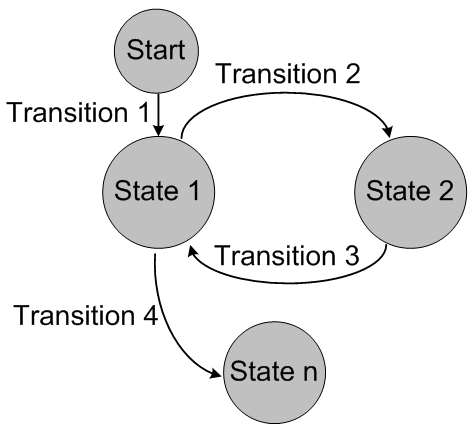
Every state is independent to each other, live separately. But, this is not real in real life. Everything in real life have the concept of state in it, period. We as programmer has a state named 'developing', you can divide it into three child states, 'coding', 'debugging', and 'testing'. When you are in one of these three states, ain't you in 'developing' state too? That's it, often the states are hierarchical. In addition, Object are composed of many components, each component has its state, they as a whole, is the state of the object. You can't modelling these physical states with state pattern effectively. Continue the example of a programmer, when you modelling it using state pattern, you can only define states like 'coding', 'debugging', 'testing', and other terminal states (like 'sleeping', 'foraging', 'resting', etc.). 'developing' is just a logical state, so, in the program, when you enter one of the three states('coding', et al.) you should know you are entering 'developing' state too, you have to remember to invoke developing state object's onentry() in addition to the terminal one. You have to remember to invoke developing state object's onexit() when leave one of the three states too. That's not an welcome dependency. And when you have to check whether you are in 'developing' state, you have to check if you are in one of the three. As you can see, when facing more practical scenarios, state pattern is powerless. What should we do?
We will continue our discussion next time, please look forward to it...

